
Textbook Innovation
From Academic Media Solutions and Textbook Media Press
To support everyone's style of learning! This is where technology cuts the cost of your course materials. Publishers like Academic Media Solutions and Textbook Media Press use our "textbook media" platform to deliver a wide range of media options at affordable prices. Giving you a break on college costs!

eBook Basic or eBook Plus
Choose from two eBook options with different prices and features.
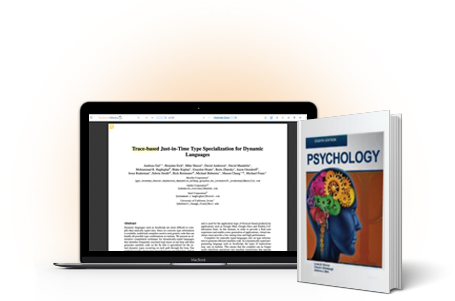
eBook + Print Bundles
For most courses there are three print options. See the Booklist for more info. Access to the bundled eBook is immediate after registration—use it while your print version ships.
What People Are Saying
"This is incredible! Finally, a fair way to get textbooks without spending a fortune!"
"I love this idea. Textbooks are so expensive. This really helps out. This is such a great idea. Thank you so much!"
"I think you guys have a terrific idea here that I think will work for me and that the students will absolutely love."
"I just had to let you know what a big fan I am of your textbook. And all this in your low-cost format? Amazing! I just can't say enough. You've got to get the word out about this book!"
"Thank you so MUCH!! This makes a lot of sense. I am so appreciative and as a poor college student, I am thanking you from the bottom of my heart."
"I believe you are way ahead of your time. The high cost of textbooks is a serious issue on educators' agenda. Thanks for providing this invaluable service."
"Many of us feel a real financial pinch at the start of every semester—scrambling to find the hundreds of dollars needed for all of those books. Professors: to eliminate the need for incredibly costly textbooks in your classes, please use Textbook Media!"
"This site is a dream come true! Textbooks are so expensive—it's a struggle at the beginning of every semester to purchase them and maintain a good financial standing. Keep up the good work!"
"I used your book this year in my marketing management course. I found the content and the coverage to be spot on. And my students loved the price options! I highly recommend Textbook Media…"
"This is awesome! What a major relief from the astronomical cost of textbooks. I'm definitely not the only one who's grateful; all students will be."
Frequently Asked Questions
How to Order
Ordering and saving is as easy as 1,2,3…
Step #1: REGISTER
Please go thru the registration process by clicking the "REGISTER" link. It will take about 60 seconds. Select STUDENT as the type of user. Save the username (email address) and password for future visits.
You will then be taken to My Account. You will see "You currently have no books to view."
Step #2: FIND ASSIGNED BOOK
To find your textbook you can use SEARCH, or the various menus provided on the left side of home page. For fast search results, enter the title, subject or last name of the author. Or, if you're using one of the menus, simply click on the course or book title.
Step #3: SELECT MEDIA/PRICE
Once you've found your book, you'll see a range of price and media options. NOTE: most of our books are offered with multiple media and price options:
Digital Options:
eBook Basic (best price--no offline access)
eBook Plus (with offline access)
Hybrid Bundles: Online + Print
Black and white loose-leaf
Black and white paperback
Color paperback
Once you've found your book, you'll see a range of price and media options. Select the format you want to purchase. Click on "Add to Cart", then Checkout. Once the order is placed, you will receive a confirmation by email.
NOTE: Print orders are print-on-demand and may take up to seven to ten business days, but you'll have access to the online e-Book immediately in MY E-BOOKS (on the left side of the home page). In addition, there are a variety of affordable study aids also available for purchase that go with your textbook.
Purchasing an eBook
Go to WWW.TEXTBOOKMEDIA.COM. Register. It will take about 60 seconds. You will be taken to ACCOUNT. You will see "You currently have no books to view."
To find your textbook you can use SEARCH, or the various menus provided on the left side of home page. For fast search results, enter the title, subject or last name of the author. Or, if you're using one of the menus, simply click on the course or book title.
Locate the book and click on Pricing Details. For most titles, we offer two types of EBOOKS.
Digital Options:
eBook Basic (best price--no offline access)
eBook Plus (with offline access)
Read the descriptions and make your choice. Click on Add to Cart, then Checkout.
Then you'll see a page for Review Order. Once processed, your e-book will be in your account home page under MY EBOOKS (on left side of the home page).
Accessing eBook with Code Purchased in Bookstore
Go to WWW.TEXTBOOKMEDIA.COM. Register. It will take about 60 seconds. You will be taken to ACCOUNT. You will see "You currently have no books to view."
To find your textbook you can use SEARCH, or the various menus provided on the left side of home page. For fast search results, enter the title, subject or last name of the author. Or, if you're using one of the menus, simply click on the course or book title.
Locate the book and click on Pricing Details. For most titles, we offer two types of EBOOKS.
Digital Options:
eBook Basic (best price--no offline access)
eBook Plus (with offline access)
Your Bookstore Code is for the eBook Plus. Select that option.
Once you've added the eBook Plus to your cart, enter the access code you purchased at the bookstore into the coupon code box. Click Apply.
Complete the check-out process and your eBook will be found in your account under MY EBOOKS on the left side of your account home page.
Using the eBook
Each time you open up your eBook, you'll see a toolbar at the top of the screen with many useful tools to aid you in your studying. Here is a breakdown of these tools and how to use them.

Table of Contents
Opens the complete table of contents for your book, allowing you to jump to any spot in the text.

Search
Enables keyword search. A list of instances of the term will be returned, allowing you to jump to that spot in the book.

Text Size
Increase or decrease the size of the text on screen to suit your needs.

Highlighter
Allows you to highlight text in the book.

Offline Viewing
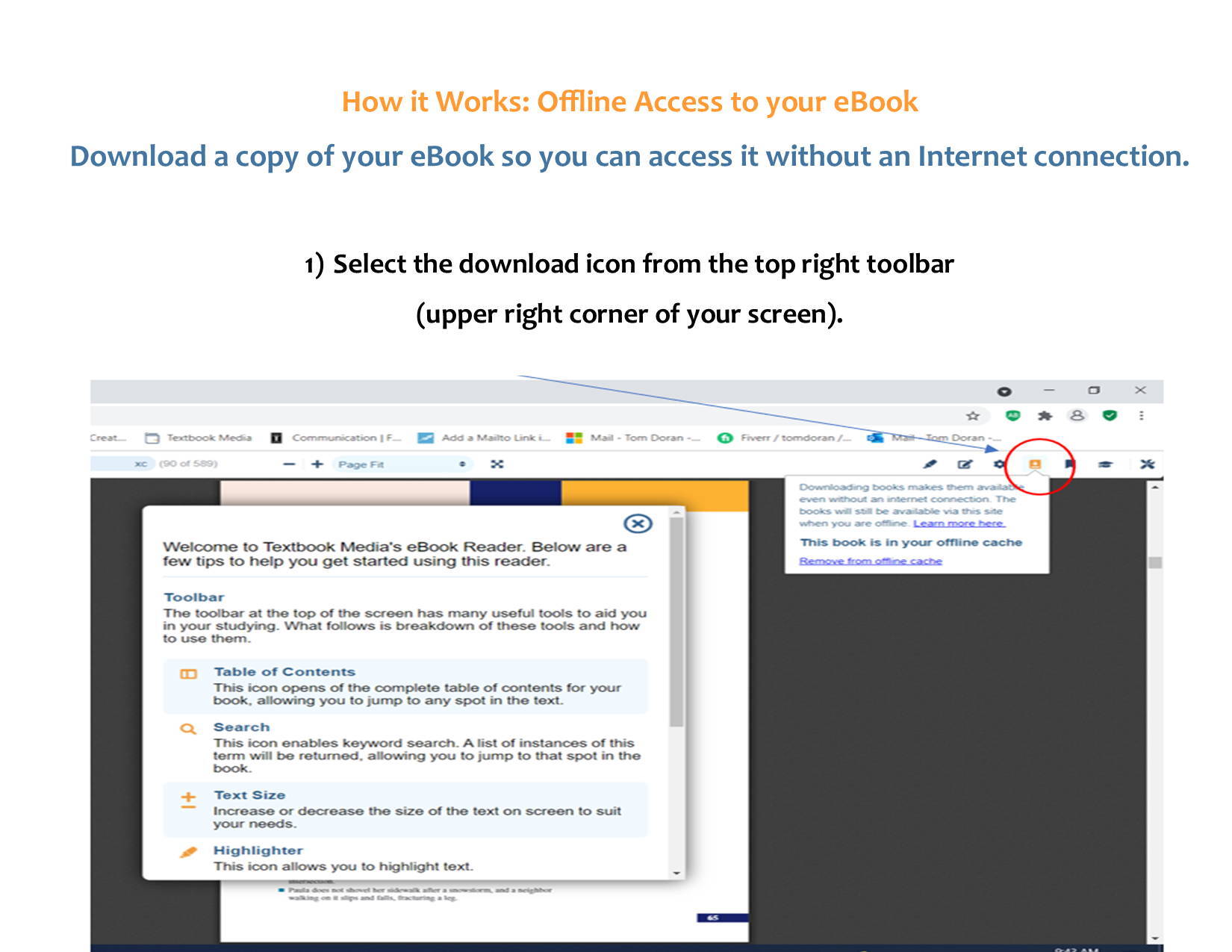
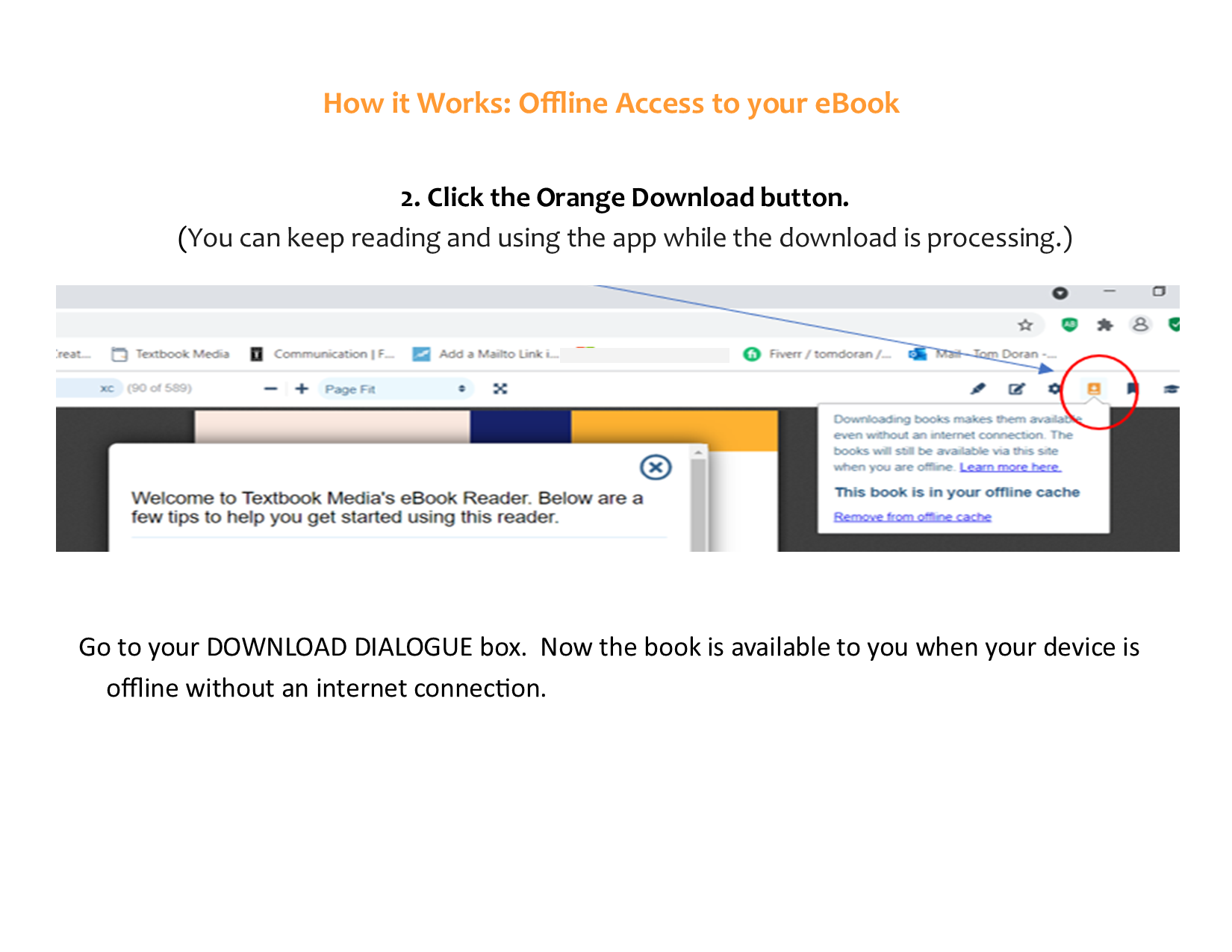
Allows you to download this book for offline viewing.

Notes
Enables note-taking in the margin of the text.

Settings
Opens a settings panel that allows you to edit certain display options.

Bookmark
Allows you to bookmark your place in the book.

Upgrades
Allows you to buy upgraded book options.
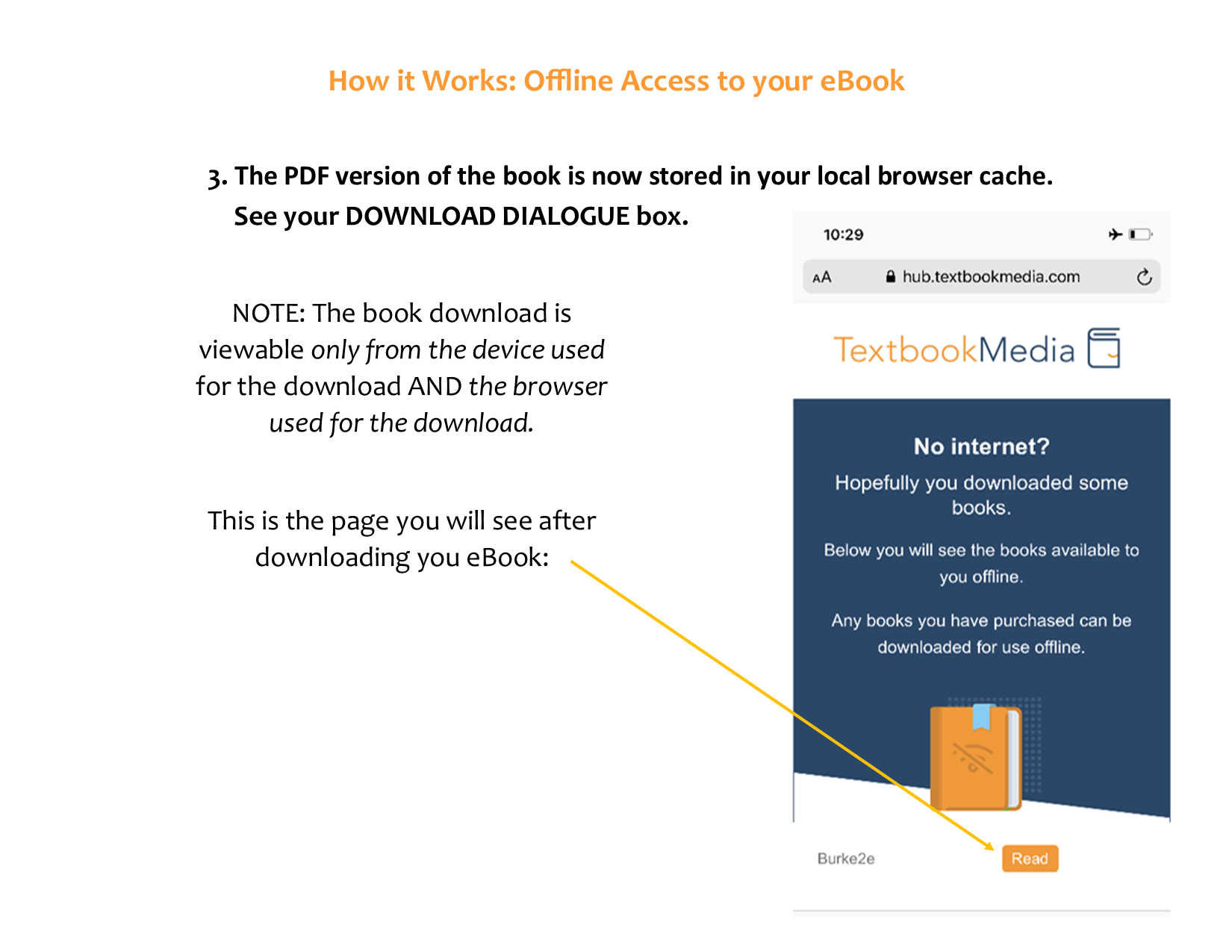
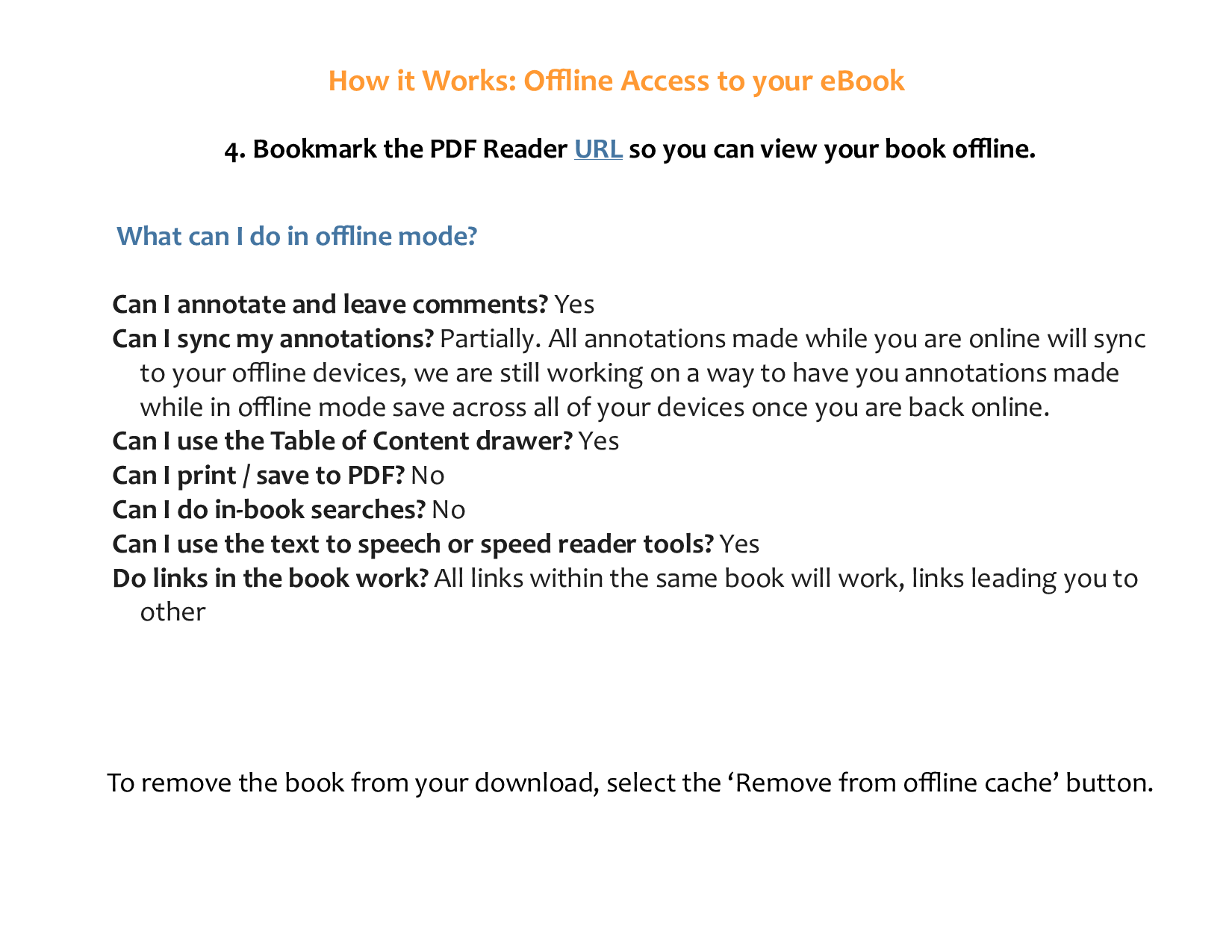
Note about Offline Access: Download the book for offline use by clicking on the download icon on your toolbar. First, highlight and save the website URL for your PDF. Then disconnect from the internet and paste in the URL that you saved. The book you've downloaded for offline use will appear as a link. Click to see your PDF.
Note about Printing: When you have the PDF, click on your browser settings. From the drop-down menu click on Print. Ten pages can be printed at a time.
Using the eBook Offline (Available with eBook Plus)
Purchasing a Hybrid Bundle (eBook + Print)
Go to WWW.TEXTBOOKMEDIA.COM. Register. It will take about 60 seconds. You will be taken to ACCOUNT. You will see "You currently have no books to view."
To find your textbook you can use SEARCH, or the various menus provided on the left side of home page. For fast search results, enter the title, subject or last name of the author. Or, if you're using one of the menus, simply click on the course or book title.
Locate the book and click on Pricing Details. For most titles, we offer three types of Hybrid Bundles:
Hybrid Bundle Options:
EBOOK + Black & White Loose-leaf (shrink-wrapped 3-hole punched--no binder)
EBOOK + Black & White Paperback
EBOOK + Color Paperback
Read the descriptions and make your choice. Click on Add to Cart, then Checkout.
Once processed, your e-book will be in your account home page under MY EBOOKS. Print orders may take up to seven to ten business days, but you'll have the online book immediately in your ACCOUNT.
Ordering and Downloading Study Aids
Ordering a Study Aid
Many of our textbooks come with some study aids/study tools. A list can be found on the left menu under STUDY TOOLS.
Or, the accompanying study tools will be featured when you select your textbook and pick your preferred media option/price.
You'll see a FREQUENTLY BOUGHT TOGETHER panel under your selected textbook/option. And below that, you'll see STUDY TOOLS. Add the study aid to your shopping cart and proceed to CHECKOUT.
Using a Study Aid
All study aids are digital downloads (with the exception of Quizlets). You can find the study aids in your account by clicking on MY STUDY AIDS on the left menu on the home page.
Study Aids are downloaded by Chapter. The list of chapters will be displayed. Simply click on the chapter you want to study and wait for the download. When you close out your session, the study aid you are using will also close out. You can access it again in your next session.
Your Account
ACCOUNT
Located on upper right. Includes your order info, shipping address, messages, recently viewed, and account setting.
MY EBOOKS
Located on left side menu on the home page. Contains the digital version of your textbook.
MY STUDY AIDS
Also located on left side menu on the home page. Contains the digital chapter files of your study aids for downloading.
PROFILE
From the home page (textbookmedia.com) click on ACCOUNT and then go to ACCOUNT SETTINGS.
ORDER STATUS
An e-mail confirmation is sent to the e-mail address you used to register. When a print book is shipped, you will receive an e-mail with tracking information. From the home page (textbookmedia.com) click on ACCOUNT and then ORDERS to find out where your order is in the process.
BILLING HISTORY
From the home page (textbookmedia.com) click on ACCOUNT and then ORDERS. From there you can look at your order history or print a receipt or invoice.